SceneFlow GitHub Project: AI Video Analysis & Script-to-Screen Synchronization
Join Our WhatsApp Channel for Latest UpdatesSceneFlow GitHub Project: AI Video Analysis & Script-to-Screen Synchronization
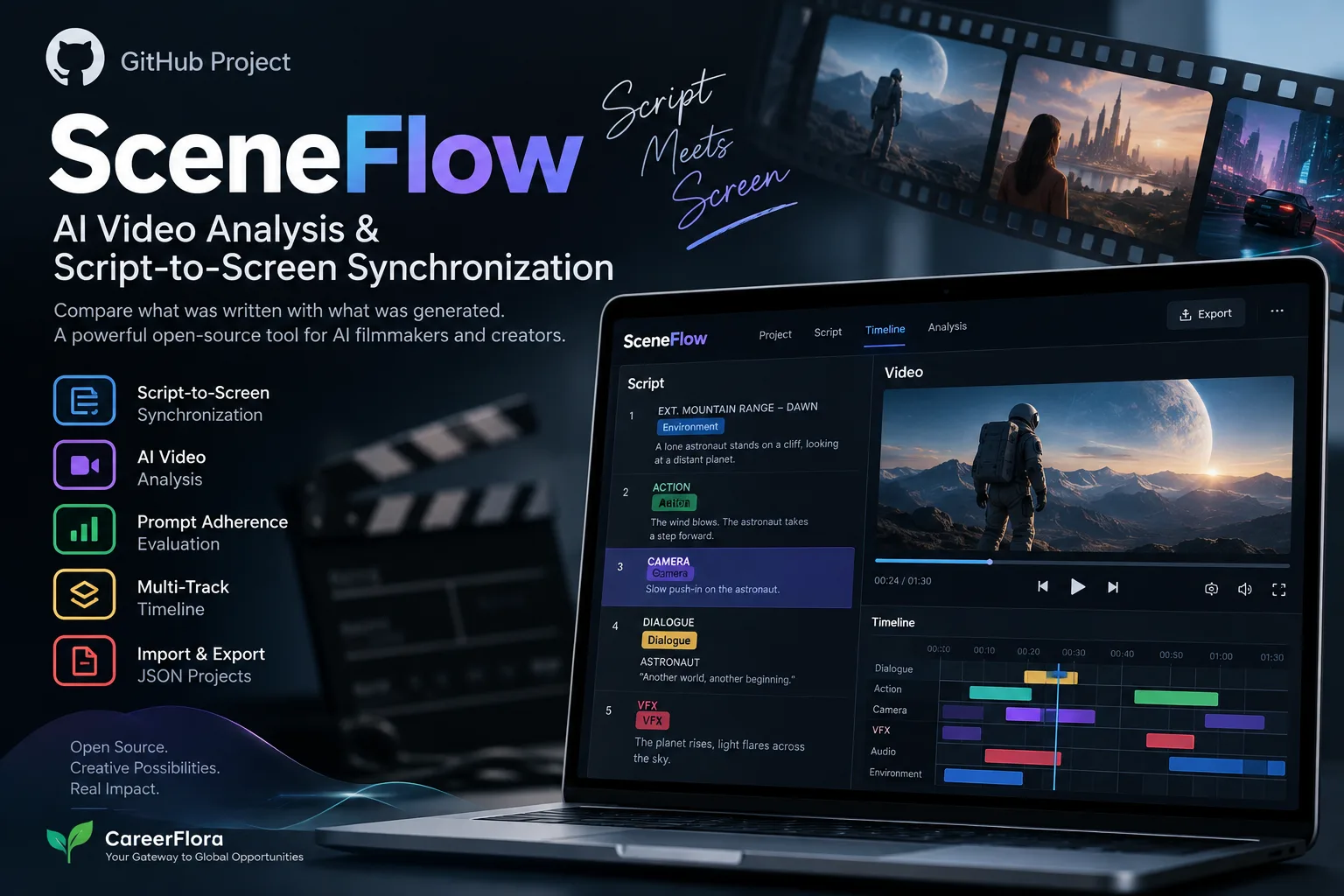
SceneFlow is an open-source web application designed for AI filmmakers, creators, and developers who want to compare AI-generated videos with their original screenplay or prompt.
It synchronizes screenplay content with video playback, helping creators evaluate prompt adherence, camera instructions, actions, dialogue, visual details, and continuity.
What Is SceneFlow?
SceneFlow focuses on a simple but important problem in AI filmmaking: does the generated video actually follow the instructions in the script?
Users can connect screenplay sections with specific video timestamps. During playback, the relevant script content is highlighted, making it easier to compare the written scene with the generated footage.
The project also supports a structured Auteur Script workflow for organizing detailed AI filmmaking instructions.
Key Features
Script-to-Screen Synchronization
SceneFlow connects screenplay segments with video timestamps and highlights the corresponding content during playback.
This allows creators to review exactly how different parts of a script translate into the final video.
Eight Cue Types
SceneFlow supports eight cue categories:
- Dialogue
- Action
- Camera
- Shot
- Audio
- VFX
- Transition
- Environment
These categories make it possible to evaluate different elements of an AI-generated scene separately.
Prompt Adherence Analysis
SceneFlow can be used to identify differences between the original instructions and generated footage, including missed elements, camera deviations, and continuity issues.
This can help creators refine prompts and improve future generations.
Multi-Track Timeline
The project includes a multi-track synchronization timeline that provides a more detailed way to inspect screenplay and video relationships.
JSON Projects
Projects can be imported and exported as JSON files, making them easier to save, share, and manage.
Responsive Web Application
SceneFlow is designed for modern web browsers and supports responsive layouts for different screen sizes.
How SceneFlow Works
The workflow can be summarized as:
Screenplay → AI Video Generation → SceneFlow Synchronization → Analysis
First, the creator writes a screenplay or structured prompt.
The scene is then generated using an AI video model.
The generated video is loaded into SceneFlow and synchronized with the relevant screenplay sections.
The creator can then review which instructions were successfully represented and identify areas that need improvement.
This creates a more structured approach to AI video evaluation and prompt iteration.
Auteur Script Workflow
SceneFlow also introduces the concept of Auteur Scripts, which provide a structured way to describe how a scene should be created.
The framework includes elements such as:
- Intent
- Logic
- Aesthetic
- Opening
- Execution
The execution layer can describe how a scene changes over time, making the approach particularly relevant to creators working with structured AI video prompts.
Technology Stack
SceneFlow is built with a modern frontend stack:
| Technology | Purpose |
|---|---|
| React 19 | User interface |
| TypeScript | Application development |
| Vite | Build and development |
| Tailwind CSS | Styling |
| Motion | Animations |
| React YouTube | Video playback |
| Vercel Analytics | Analytics |
What Developers Can Learn
SceneFlow is useful to study because it combines several practical software concepts in one project:
- React and TypeScript architecture
- Video synchronization
- Timeline-based interfaces
- Interactive media UI
- JSON-based project management
- Responsive web development
- Structured screenplay data
- AI video workflows
For developers, it is a good example of how a specific problem in generative AI can be turned into a focused software product.
How to Explore SceneFlow
You can start with the project by:
- Opening the GitHub repository.
- Reading the README and project documentation.
- Cloning the repository.
- Installing the required dependencies.
- Running the application locally.
- Exploring the synchronization workflow.
- Testing it with your own screenplay and video.
- Studying or modifying the source code.
The repository lists Node.js 18+ and npm or Yarn among its development requirements.
Why SceneFlow Is Worth Exploring
AI video generation is moving beyond simply creating visually impressive clips. Consistency, prompt adherence and controllability are becoming equally important.
SceneFlow addresses this part of the workflow by providing a way to connect the creative instructions with the generated result.
For developers and AI creators, it offers both a practical tool and an interesting example of building software around emerging generative-AI workflows.
Open-Source License
SceneFlow is released under the MIT License.
Before reusing or redistributing the project or its components, developers should review the repository's current license and documentation.
Official Resources
GitHub Repository: https://github.com/taruma/SceneFlow
Live Application: https://sceneflow.taruma.my.id/
Final Thoughts
SceneFlow demonstrates an interesting direction for AI filmmaking: moving from video generation toward measurable control and evaluation.
By synchronizing screenplays with generated footage, it gives creators a structured way to inspect whether their instructions were actually reflected on screen.
For anyone interested in AI video, prompt engineering, creative AI, React development, or open-source projects, SceneFlow is worth exploring.
CareerFlora — Your Gateway to Global Opportunities